The impact of Managed IT Services on customer experience

The world of IT is always evolving, and managed IT services are becoming more and more prominent in the business world. As an IT professional, I’ve had the pleasure of witnessing the impact of managed IT services on customer experience, and let me tell you, it’s been a game-changer.

What are managed IT services, you ask? Simply put, it’s the outsourcing of a company’s IT functions to a third-party provider. This includes everything from hardware and software installation to system maintenance and security.

So, how does this affect customer experience? Let’s break it down.

Improved uptime

With managed IT services, businesses can have 24/7 monitoring and support, ensuring that their systems are always up and running. This means less downtime and interruptions, which translates to happier customers who can continue to do business without any delays.

Faster issue resolution

When technical issues arise, they can be resolved quickly with managed IT services. The provider has a team of experts who can troubleshoot and fix issues remotely, minimizing the impact on the customer. This means less frustration for customers and a faster resolution to their problems.

Stronger security measures

Managed IT services also provide top-notch security measures to protect businesses and their customers’ data. Providers use the latest technology and best practices to ensure that systems are secure and that data is protected. This gives customers peace of mind knowing that their information is safe and secure.

Allows for scalability

As a business grows, its IT needs will also grow. With managed IT services, businesses can easily scale their IT systems without having to worry about the cost and time required to do it in-house. This means that businesses can continue to provide excellent customer service without any IT roadblocks.

In conclusion, managed IT services have revolutionized the way businesses operate and have a significant impact on customer experience. With increased uptime, faster issue resolution, stronger security measures, and scalability, businesses can provide an unparalleled level of service to their customers. So, if you’re not already utilizing managed IT services, it’s time to make the switch and see what it can do for your business and your customers.

P.S - Managed IT services are like the superheroes of the IT world - always ready to save the day!
Windows 8.1 Just Lost All Support. Here's What You Need to Know

Companies both large and small share this one cybersecurity problem. They have computers that are still running older operating systems. Staff might use these devices only occasionally. Or the company may be running customized software that won’t run on newer OS versions.

The problem is that when the OS becomes outdated, the system is open to cyberattacks. When Microsoft or another developer retires an OS, it means that it is no longer supported. No more feature updates and no more security patches for newly found vulnerabilities.

The latest operating system to lose all support is Windows 8.1. Microsoft released the OS in 2013, and it was officially retired on January 10, 2023. Microsoft issued the following warning for companies:

“Continuing to use Windows 8.1 after January 10, 2023 may increase an organization’s exposure to security risks or impact its ability to meet compliance obligations.”

Here are a few facts you should know about what this retirement of Windows 8.1 means.

The OS Will Still Technically Work

When an operating system reaches its end of life, it doesn’t just stop working. Thus, many companies go on using it without realizing the security risk. Technically, the OS will work as it did the day before retirement. But it’s a lot less safe due to the loss of support.

Your System Will No Longer Receive Security Patches

Software and OS vulnerabilities are sought out and exploited all the time. This is what hackers do for a living. The vulnerability cycle usually begins with hackers finding a software “loophole.” They then write code to exploit it that allows them some type of system access.

The software developer learns of this, usually once hackers start breaching systems. They write code to fix that vulnerability. Developers then send the fix to users via an update that they install. This protects the device from one or more hacker exploits.

When an OS reaches its end of life, these fixes are no longer made. The developer has moved on to focus on its newer products. So, the vulnerability remains. It leaves a device vulnerable to hacks for days, months, or years afterward.

Approximately 61% of security vulnerabilities in corporate networks are over five years old.

Options for Upgrading

If you have a computer that is still running Windows 8.1, you have two options for upgrading. You can opt for Windows 10 or Windows 11. If the computer is running such an old OS, there is a chance your system may not meet the requirements for one or both. In this case, you may need to buy a new device altogether.

Microsoft states that there is no free option to upgrade from 8.1 to Windows 10 or 11. Some of the advantages you gain when upgrading include:

What Happens If I Don’t Upgrade?

Security & Compliance Issues

Your data security is at risk if you stay on Windows 8.1. Without any security updates, any vulnerabilities will stay unpatched. This leaves your system highly vulnerable to a breach. One hacked system on a network can also cause the breach or malware infection to spread to newer devices.

If you have to comply with a data privacy regulation, like HIPAA, you’ll also run into issues. Data privacy rules dictate making reasonable efforts to protect data. Using a device with an outdated OS jeopardizes meeting compliance.

Slowed Productivity

The older systems get, the slower they get. Staff that must work on outdated software often complain that it hurts productivity. 77% of surveyed employees were frustrated with outdated tech. Employees dealing with outmoded systems may also quit. They are 450% more likely to want to leave and work elsewhere.

An outdated operating system can hold your staff back. They miss out on modern time-saving features. They can also run into problems with bugs that will no longer get fixed.

Incompatibility With Newer Tools

Software and hardware developers aren’t looking back. Once Microsoft retires an OS, they aren’t prioritizing its compatibility. In fact, some may not want their product to be compatible with it because of the liability.

When you have issues using modern software and hardware it hurts your business. You become less competitive and begin to fall behind. Staying on an outmoded OS keeps you stuck in the past.

Get Help With Your Windows Upgrades

We can help you upgrade smoothly from an older Windows OS to a new one. If you need a new system, we can point you in the right direction for the best value. Give us a call today to schedule a chat about upgrades and where your security stands.

--
Featured Image Credit

This Article has been Republished with Permission from The Technology Press.

Managed IT Services for remote work: Best practices and tips

Are you tired of working from home and dealing with IT problems on your own? Do you miss the days of walking up to the IT department and asking for help? Fear not, because managed IT services are here to save the day! As an IT professional, I've learned some best practices and tips for managing IT services for remote work that I'd love to share with you. So let's dive in!

Set Up a Remote Workstation

First things first, you need to make sure your remote workstation is set up properly. This includes having a good internet connection, a secure VPN, and the necessary software and applications to do your job. Talk to your IT department about getting the right equipment or upgrading your current setup. Trust me, working from a laptop on your couch might sound great, but it'll only lead to bad posture and a slow laptop.

Create a System for Troubleshooting

When working remotely, you need to have a system in place for troubleshooting IT problems. Create a help desk or ticketing system to track and solve technical issues. It's also important to have a designated IT contact for employees to reach out to when they have problems. This person can be your go-to for technical problems and can escalate issues if needed.

Stay Secure

One of the biggest concerns with remote work is security. Make sure your IT department has implemented security measures to protect against cyber threats. This includes two-factor authentication, strong passwords, and firewalls. Don't forget about data backups too! Losing important data can be a nightmare, so make sure your IT team has a plan in place for data recovery.

Encourage Communication

Communication is key in any workplace, but it's especially important when working remotely. Encourage employees to reach out to IT with any problems or concerns. This could be as simple as setting up a chat system or having frequent video meetings. The more communication you have, the easier it is to solve technical problems and keep everyone connected.

Stay Up-to-Date

Technology is constantly changing, and it's important for your IT team to stay up-to-date on the latest trends and updates. From new software applications to cybersecurity threats, you need to be aware of what's happening in the IT world. Encourage your IT team to attend conferences or training sessions to keep their skills sharp.

Final Thoughts

Managed IT services are a game-changer for remote work. With the right setup, troubleshooting system, security measures, communication, and staying up-to-date, you can tackle any IT problem that comes your way. So go ahead, work from home in your pajamas, but make sure you have the right IT support to back you up. Happy remote working!

Managed IT Services for startups: What you need to know

Managed IT Services for Startups: What You Need to Know

Hey there tech savvy entrepreneurs, are you ready to take your startup to the next level? If you're reading this, then you're probably in need of some IT support.

As a fellow IT professional, I understand how complicated and frustrating managing your company's technology can be. But don't worry, that's where managed IT services come into play.

In this article, I'm going to break down everything you need to know about managed IT services for startups.

What Are Managed IT Services?

Simply put, managed IT services are when a company outsources their technology management and support to a professional IT provider. This provider will handle everything from software updates to data backup and security.

Why Do Startups Need Managed IT Services?

First and foremost, startups need to focus on their core competencies. Your team doesn't have time to deal with IT issues when they should be developing your product or service.

Additionally, managed IT services can actually save you money in the long run. By outsourcing your IT needs, you won't have to pay for an in-house IT department or deal with unexpected technology expenses.

What Services Do Managed IT Providers Offer?

Managed IT providers offer a wide range of services, including:

1. Network monitoring and maintenance
2. Data backup and disaster recovery
3. Cybersecurity
4. Cloud computing solutions
5. Software updates and patches
6. Helpdesk support

How Do You Choose the Right Managed IT Provider?

When it comes to choosing a managed IT provider, it's important to do your research. Here are some things to consider:

1. Look for a provider with experience in your industry
2. Read online reviews and testimonials
3. Ask for references from current or past clients
4. Check for certifications and awards
5. Make sure they offer 24/7 support

Conclusion

In conclusion, managed IT services can provide startups with a much-needed solution to their technology woes. By outsourcing your IT needs, you can save time and money, while also ensuring the security and stability of your business.

So what are you waiting for? It's time to take your startup to the next level with managed IT services!

Why You Need to Think Twice Before Using Lensa AI & Other Self-Portrait Apps

It’s a common theme. You begin seeing these amazing CGI images of your friends on Facebook or Instagram. You think, “How can I make one?”

Filters and self-portrait apps have come a long way. You can now make yourself look like Hollywood’s version of a character in the next hit animated film. It still kind of looks like you, only a dream version with “perfect” hair, skin, and facial features.

The latest of these modern vanity marvels to make the rounds is Lensa AI. You upload about 10 photos so the app can feed that data into its AI algorithm. Then, once it maps your facial features, it generates several fantasy selfies of you.

These magical avatars don’t come for free though. While you can download the app for free and use it in a limited fashion, you need to pay to do more. To get unlimited access for one week, it’s $2.99. There are several pricing tiers for its avatar packs and membership access. These range from $3.99 for Avatars Pack 1 to $35.99 for full membership.

It sounds like a little harmless digital fun, right? That’s what many companies making apps like this like you to think. Vanity is an easy sell, and who doesn’t want to have a fabulous profile pic?

But for Lensa AI and several similar self-portrait apps, you’re paying more than you know. The cost comes from the data privacy rights you’re giving up. And these can go far beyond the app itself.

Why Worry About Data Privacy with Lensa AI & Similar Apps?

Thanks to laws like GDPR, software and app developers need to tell you what they do with your data. Looking at the app at the Mac App Store, a few alarming things jump out.

Data Used to Track You

Once you download the Lensa AI app, it can track your phone activity. The app store states that the app may use purchases and unique identifiers to track you. And this doesn’t mean only tracking you while in Lensa AI. It can track you across websites and apps owned by other companies.

Data Collected

Lensa AI scours your device for a lot of different data points. By downloading it, you permit it to do this. Some of the tracking links to you personally (such as linked to your name, IP address, or phone number). It collects a lot of other data, but not with your name or another identifier on it.

Data collected and linked to you:

Data collected, but not linked to you:

Loss of Rights to Your Uploaded Images

What apps like Lensa AI do with your data is a grey area. Many tech companies, such as Facebook, have been known to act irresponsibly with user data. Many are purposely vague in their terms and conditions, leaving the door open.

One section from the Lensa AI Terms that users agree to states the following:

“…solely for the purposes of operating or improving Lensa, you grant us a time-limited, revocable, non-exclusive, royalty-free, worldwide, fully-paid, transferable, sub-licensable license to use, reproduce, modify, distribute, create derivative works of your User Content, without any additional compensation to you…”

For the sole purpose of “operating” Lensa, could mean anything. It could mean that to make more money to operate the business, the company needs to use your images. Note that it also states it can modify, distribute, etc. YOUR user content.

Things You Can Do to Protect Your Data Privacy

Don’t Immediately Jump on Every Fad

This one may be hard when you see all your friends using a new app. It’s natural to want to be a part of that. But try waiting a week. Most likely those avatar images from the latest selfie app won’t be blowing up your feed anymore.

Read App Terms & Conditions

Take the time to read an app’s terms. You are often giving up more data privacy rights than you realize. This includes giving an app the ability to track just about everything you do on your device. Be aware of what’s at risk before you download a new app.

Restrict Data Collection

If you can’t resist an app’s charms, at least make it as secure as possible. This includes taking the time to restrict its data collection features, where possible.

Use your phone’s privacy and security settings to turn off data sharing. For the Lensa AI app, you can also contact the company to request that it delete your data from its servers. Its privacy policy states to email privacy@lensa-ai.com for questions and concerns.

Get a Device Privacy Checkup

The more apps you use, the more complicated data privacy can get. Don’t leave it to chance. We’ll be happy to help. Give us a call today to schedule a device privacy checkup.

--
Featured Image Credit

This Article has been Republished with Permission from The Technology Press.

The future of Managed IT Services: Trends to watch


The Future of Managed IT Services: Trends to Watch

As a seasoned IT professional, I've seen the industry undergo many changes over the years. Technology is constantly evolving, and Managed IT services are quickly becoming the norm. This means that IT professionals like myself need to stay up-to-date with the latest developments to remain relevant and competitive in the industry.

Cloud-based Solutions

The transition to cloud-based solutions has been happening for quite some time now. However, we can expect to see more companies embrace cloud technology in the years to come. The shift from on-premise servers to cloud-hosted solutions offers many benefits, including increased flexibility, scalability, and cost savings. IT professionals who are well-versed in cloud deployment and migration will be in high demand.

Increased Security Measures

As organizations continue to rely more heavily on technology, cybersecurity threats are becoming more prevalent. Managed IT services providers will need to implement new measures to protect against cyber-attacks, including multi-factor authentication, data encryption, and advanced firewalls. IT professionals who are skilled in cybersecurity and data protection will have a competitive edge in the job market.

Artificial Intelligence and Machine Learning

Artificial intelligence (AI) and machine learning (ML) are already making waves in the IT industry, and we can expect to see even more exciting developments in the years to come. AI and ML can be used to automate many IT tasks, including network monitoring, troubleshooting, and even security. IT professionals who can leverage these technologies to improve efficiency and productivity will be highly sought after.

Internet of Things (IoT)

The Internet of Things (IoT) is transforming the way we live and work. We can expect to see even more IoT devices in the workplace in the coming years, which means an increased demand for IT professionals who can manage and secure these devices. The ability to integrate and manage IoT devices will become a critical skill for IT professionals.

Remote Workforces

The COVID-19 pandemic has accelerated the trend towards remote work, and it looks like this trend is here to stay. Managed IT services providers will need to adapt to support remote workforces, including implementing cloud-based solutions and maintaining secure connections for remote access. IT professionals who are well-versed in remote workforce management will be highly valuable.

Conclusion

The IT industry is in a constant state of flux, and it's essential for professionals to keep up with the latest trends and developments. The future of Managed IT services is exciting, and there are many exciting opportunities for those who are willing to adapt and learn. As someone who has been working in IT for many years, I can say with confidence that the future of Managed IT services is bright.

Managed IT Services for financial services: Trends and considerations.

Managed IT Services for Financial Services: Trends and Considerations

So, you work in financial services, huh? That's exciting! The world of banking and investment is fast-paced and ever-evolving. It's important to keep up with the latest trends and tools to stay competitive in a market that never sleeps.

One of the most significant ways to gain a competitive edge in finance is by utilizing managed IT services. Technology is at the heart of the financial industry, and having the right IT support can take your institution to the next level. Let's dive into the latest trends and considerations when it comes to managed IT services for financial services.

Outsourcing IT Support – A Growing Trend

Gone are the days where every company needed an entire IT department on-site. Outsourcing IT support has become increasingly popular in recent years, and there's no exception in the financial industry. Managed IT services can offer cost-effective and scalable solutions for your company's technology needs. Instead of having an entire IT team on payroll, you can have access to a team of experts at a fraction of the cost. Plus, with the latest advances in remote support, you can have access to your IT team 24/7 without ever leaving your desk.

Cybersecurity – The Top Priority

When it comes to finances, security is the top priority. Cybersecurity threats are constantly evolving, and it's essential to have a robust security strategy in place. It's no longer just about protecting sensitive data, but also about protecting against the financial repercussions of a data breach. Managed IT services can provide the latest security solutions to protect your company's assets and reputation.

Cloud Computing – The Future of Finances

Cloud computing has changed the game in the financial industry. The ability to access data and applications from anywhere in the world has revolutionized the way we do business. Managed IT services can help you migrate to the cloud seamlessly and securely. Plus, the cloud offers an efficient and cost-effective solution for data storage and disaster recovery.

Compliance – Staying Ahead of the Curve

Compliance is a significant concern in the financial industry. Keeping up with the latest regulations and standards can be a daunting task, but managed IT services can help. IT professionals can ensure that your technology is compliant with all rules and regulations, so you can focus on what really matters – serving your clients.

In Conclusion

Managed IT services are the way of the future in the financial industry. Outsourcing IT support can offer cost-effective and scalable solutions for your company's technology needs. Cybersecurity is the top priority, and managed IT services can provide the latest security solutions to protect your company's assets and reputation. Cloud computing offers an efficient and cost-effective solution for data storage and disaster recovery, and IT professionals can ensure compliance with all rules and regulations. With the right IT support, the sky's the limit for your financial institution.

Microsoft Forms: One of the Handiest Freebies in Microsoft 365

Microsoft 365 is one of the most popular cloud platforms in the world, with about 345 million paid seats. Microsoft cloud tools numbers were up 32% in Q3 2022 compared to the previous year.

One of the reasons for its continued growth is the suite of cloud tools offered in the service. Users get a stable of over 20 different apps, including the core MS Office suite.

With so many different apps, it’s not uncommon for some to go unused. Companies may not even be aware they have access to these other helpful tools. One of the handiest apps you get with a Microsoft 365 subscription is Microsoft Forms.

From sending year-end customer surveys to assessing change readiness, Forms makes it easy. This online survey and form-building tool has a lot to offer organizations. And if you have a subscription to Microsoft 365, then you already get Forms included for free.

What Is Microsoft Forms?

Microsoft Forms is a drag-and-drop form, quiz, and survey creator. It’s simple to use and allows you to send out surveys via a link. Recipients can fill out your form online from any device.

Once recipients fill out the survey, the results come into the software instantly. You can see the collated results charted in the software. You can also export the results to Excel.

How to Get Started in Forms:

  1. Visit Forms.office.com and log into your Microsoft account.
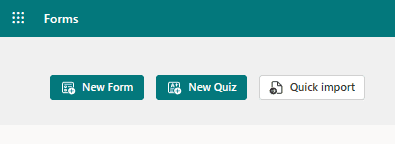
  2. Choose “New Form” or “New Quiz: from the top menu
Forms
  1. OR you can choose to explore the built-in templates.
Templates-1
Templates-2
  1. Click “Add New” to add a new form field. You can choose from field types:
    • Choice (i.e., multiple-choice question)
    • Text
    • Rating
    • Date
    • Ranking
    • Likert (a scale that records attitudes/opinions about a topic)
    • Net Promoter Score® (a scale from “not likely” to “extremely likely”)
    • Section (separator that can include a title and image)
  2. Enter your questions.
  3. Once finished, click “Send” at the top. You can distribute the survey using the following options:
    • Link to a web form
    • Email
    • QR code
    • Embed in a web page
    • Via Facebook or Twitter
  4. View responses on the “Responses” tab
Responses tab

Advantages of Using Microsoft Forms

It’s Included in Microsoft 365 Subscriptions

If you already subscribe to Microsoft 365, then it makes sense to use Forms. It can save you money if you’re using a separate survey tool, like Survey Monkey. It’s easily accessible by signing in with your Microsoft account.

It Saves Time

Sending a survey by email is time-consuming. You have to worry about emails bouncing due to an attachment. You also need to spend time collating all the results as they come in.

Using MS Forms can save you a lot of time. People don’t need to download anything or open an email file attachment. They simply follow your link and fill out the form online. As soon as they fill the survey out, you get the result. Forms also collates all the answers for you.

Get Charted Results Automatically

You can quickly see the results of the survey in meaningful graphs. Forms makes it simple to export to Excel if you want to upload the survey results into another platform.

On the “Responses” tab, you can hover over the result graphs to see the details.

Charted Results
Image from ocmsolution.com

It’s Easy to Use

There’s a very low learning curve with Microsoft Forms. The interface is intuitive and simple, so just about everyone can jump in and start using it.

What Are Some Ways You Can Leverage Microsoft Forms?

Annual Customer Satisfaction Survey

Using a web-based survey can increase your response rate from customers. They can fill out your satisfaction survey from any device, making it quick and easy for them.

You can see results instantly. Then, chart them to gain insights into what your business is doing right, and what you can improve upon.

Employee Security Awareness Quiz

Send a security awareness quiz to your employees using Forms. It can be easily integrated into your cybersecurity awareness training. The platform also tells you the average response time per person.

Change Readiness Survey

Change management is a growing focus of many organizations. This is due to the speed of technology-driven transitions. You can use Forms to improve user readiness for change adoption. Create and send out a change readiness survey to affected groups.

Event Registrations

Are you hosting an event? You can easily gather registration details. Send out a Forms link via QR code, social media, text, or email.

Volunteer Registration Form

Embed an MS Forms registration form on your web page to sign up volunteers. The platform will automatically collate different talents or other volunteer information. This helps you better match people's talents to your needs.

And More

You’ll find more ideas from the Forms templates. Such as:

Would You Like to Get More Out of Microsoft 365?

There is a good chance that your company may be leaving some value on the table with M365. Give us a call today to learn more about our Microsoft 365 support services.

--
Featured Image Credit

This Article has been Republished with Permission from The Technology Press.

Managed IT Services for government and public sector organizations

Managed IT Services for Government and Public Sector Organizations: Let's Get this Party Started!

Hey there, fellow IT peeps! Are you working for a government or public sector organization and feeling the pressure to keep up with the fast-paced, ever-evolving world of technology? Do you dread the thought of managing hardware, software, and networks that seem to be multiplying like rabbits? Fear not, my friend! Managed IT Services are here to save the day.

What is Managed IT Services?

You may be asking yourself, what are Managed IT Services? Think of it as having your very own IT department without having to build and maintain the department's infrastructure, pay for employee salaries and benefits, and constantly train your staff on the latest technology. Managed IT Services providers take care of all of that for you!

Why Managed IT Services Rock

Let's face it, working in IT can sometimes feel like a never-ending 80s disco party where the music is too loud, the lights are too bright, and there's no escape from the swarm of users complaining about their computer issues. Managed IT Services providers give you and your team a break from the madness. They have the expertise and resources to keep your infrastructure running smoothly, allowing you to focus on other important tasks.

Benefits of Managed IT Services

A few of the benefits of Managed IT Services include:

- 24/7 support: Say goodbye to after-hours support calls and emails. Managed IT Services providers have designated support staff to handle any issues that arise, any time of day.
- Increased security: In today's digital age, security threats are everywhere. Managed IT Services providers continuously monitor and update security measures to keep your organization's data safe.
- Predictable costs: With Managed IT Services, you pay a set monthly fee, making it easier to manage your IT budget.

Choosing the Right Managed IT Services Provider

Choosing the right Managed IT Services provider can be daunting. You want to find a company that understands your organization's needs and can grow with you. Here are a few tips to consider when selecting a provider:

- Look for a company with experience working with government and public sector organizations.
- Make sure the provider offers a variety of services that meet your specific requirements.
- Ask for references and don't be afraid to do your research.

This Ain't No Disco Inferno

Managing IT for a government or public sector organization can be stressful, but with Managed IT Services, you can take a break from the hustle and bustle of daily maintenance and focus on the big picture. Don't be left in the dark, contact a Managed IT Services provider today and let's get this party started!

How Managed IT Services can help with compliance and regulatory requirements

How Managed IT Services Can Help with Compliance and Regulatory Requirements

Hey there, tech gurus! As professionals in the IT industry, one of the biggest challenges we face is ensuring our clients' compliance with regulatory requirements. It's a daunting task, but don't worry, we've got you covered. In this article, we'll explore how Managed IT Services can help with compliance and regulatory requirements in a way that will make you want to jump for joy!

What are Compliance and Regulatory Requirements?

First off, let's define these terms. Compliance refers to the adherence to rules, regulations, and standards set by governing bodies. This can include laws, policies, and contractual obligations. Regulatory requirements are the specific rules and guidelines set forth by regulatory bodies such as HIPAA, PCI-DSS, and SOX, to name a few.

Why is Compliance Important?

For starters, failure to comply can result in hefty fines and legal action. And let's not forget about the reputational damage that can occur from a data breach, as well as the loss of trust from your clients. It's essential that your organization is proactive in addressing compliance and regulatory requirements to ensure that you're not caught off guard.

How Can Managed IT Services Help?

Managed IT Services can help your organization with compliance and regulatory requirements in a few ways:

1. Keeping Up-to-Date with Changes in Regulations

Regulatory requirements aren't set in stone. They're constantly evolving, as evidenced by the frequent updates to HIPAA, for example. Managed IT Services providers stay on top of these changes and ensure that your organization is always up-to-date with the latest regulations.

2. Implementing Security Best Practices

A critical component of compliance is having proper security measures in place. Managed IT Services providers can assist with a range of security measures, such as implementing firewalls, encryption, and access controls. These measures will not only help you meet regulatory requirements but will also enhance your overall security posture.

3. Conducting Regular Audits and Assessments

Regular audits and assessments are a vital component of compliance. Managed IT Services providers can conduct these assessments to ensure that your organization is adhering to regulatory requirements. These assessments can also help identify areas for improvement and provide recommendations for remediation.

4. Providing Professional Support

Managing compliance and regulatory requirements can be overwhelming, especially for small to mid-sized organizations. Managed IT Services providers can provide professional support and guidance to ensure that your organization is meeting its compliance obligations. This support can range from providing training to employees to developing compliance policies and procedures.

Conclusion

Ensuring compliance with regulatory requirements is a critical task that should not be taken lightly. It requires ongoing effort and attention to detail. With the help of Managed IT Services, your organization can ensure that it's meeting its compliance obligations and protecting itself from potentially disastrous consequences. So relax, take a deep breath, and let the tech gurus do what they do best!

Flood IT Support
Privacy Overview

This website uses cookies so that we can provide you with the best user experience possible. Cookie information is stored in your browser and performs functions such as recognising you when you return to our website and helping our team to understand which sections of the website you find most interesting and useful.
